Posts

Check browser Type in javascript

 1-check if your browser is internet explorer function isIE() { var ie = (navigator.userAgent.indexOf("MSIE") != -1); return ie; } 2- 1-check if your browser is FireFox function isFireFox() { var fireFox = (navigator.userAgent.indexOf("Mozilla") != -1 || navigator.userAgent.indexOf("FireFox") != -1); return fireFox; }

How To Return A C# Anonymous Type From A Method

Step 1 : Use the follwing method : private   static   object  ReturnAnonymous() { return   new  { FirstName =  "FName" , MiddleName =  "MName" , LastName =  "LName"  }; } Step 2: Use the follwing method to cast your object : private   static  T Cast<T>( object  o, T type) { return  (T)o; } Step 3:and you can use the code like that : static   void  Main( string [] args) { var anon = Cast(ReturnAnon(),  new  { FirstName =  “” , MiddleName =  “” , LastName =  “”  }); Console.WriteLine(String.Format( “FirstName: {0}” , anon.FirstName)); Console.WriteLine(String.Format( “MiddleName: {0}” , anon.MiddleName)); Console.WriteLine(String.Format( “LastName: {0}” , anon.LastName)); Console.ReadLine(); }

privacy policy

modernmobile team has adopted this privacy policy (“Privacy Policy”) to explain how modernmobile collects, stores, and uses the information collected in connection with modernmobile’s Services. BY INSTALLING, USING, REGISTERING TO OR OTHERWISE ACCESSING THE SERVICES, YOU AGREE TO THIS PRIVACY POLICY AND GIVE AN EXPLICIT AND INFORMED CONSENT TO THE PROCESSING OF YOUR PERSONAL DATA IN ACCORDANCE WITH THIS PRIVACY POLICY. IF YOU DO NOT AGREE TO THIS PRIVACY POLICY, PLEASE DO NOT INSTALL, USE, REGISTER TO OR OTHERWISE ACCESS THE SERVICES. modernmobile reserves the right to modify this Privacy Policy at reasonable times, so please review it frequently. If modernmobile makes material or significant changes to this Privacy Policy, modernmobile may post a notice on modernmobile’s website along with the updated Privacy Policy. Your continued use of Services will signify your acceptance of the changes to this Privacy Policy. Non-personal data For purposes of this Privacy Policy, “non-...

Checkbox and RadioButon in xamarin forms

Image
Step 1: Install the following plugin : Xamarin.Forms.InputKit Step 2 : Add this line in page deceleration:    xmlns:input="clr-namespace:Plugin.InputKit.Shared.Controls;assembly=Plugin.InputKit" Step 3 : 1 . CheckBox you can use checkbox like that :              <input:CheckBox Text="Option 1" Type="Box" />             <input:CheckBox Text="Hello World I'm Option 2" Type="Check"/>             <input:CheckBox Text="Consetetur eum kasd eos dolore Option 3" Type="Cross"/>             <input:CheckBox Text="Sea sed justo" Type="Star"/> Result : ** checkbox have the following properties : CheckChanged: (Event) Invokes when check changed. CheckChangedCommand: (Command) Bindable Command, executed when check changed. Key: (int) A key you can set to define checkboxes as ID. Text: (string) Text...

Checking Battery Status Using Xamarin.Forms

Step 1 : add the following NuGet Packages to your project. Xam.Plugin.Battery  Step 2 :  Use the following Code :   private void btn_Clicked(object sender, EventArgs e)          {              if (CrossBattery.IsSupported)              {                  var falta = CrossBattery.Current.RemainingChargePercent;  //Current battery level 0 - 100                Lb1.Text = $"PERSENTAGE: {falta.ToString()}";                     var status = CrossBattery.Current.Status;  // Current status of the battery                Lb1.Text += $"STATUS:{status.ToString()}\n";                  ...

Prevent Rapid Clicks On a Button in Xamarin Forms

Things developers face while programming: We have seen rapid clicking on a button invoking the same event or the same process many times. Here we will find a way to control the rapid click error of a button. We can write a class named SingleClick, in which we will write a method, Click with Object and EventArgs, as arguments to do the magic. Refer to the below code snippet for more.  public class SingleClick   {       bool hasClicked;       #region Button Click       Action < object, EventArgs > _setClick;       public SingleClick(Action < object, EventArgs > setClick)       {           _setClick = setClick;       }#endregion Button Click          public void Click(object s, EventArgs e)        {           if (!hasCli...

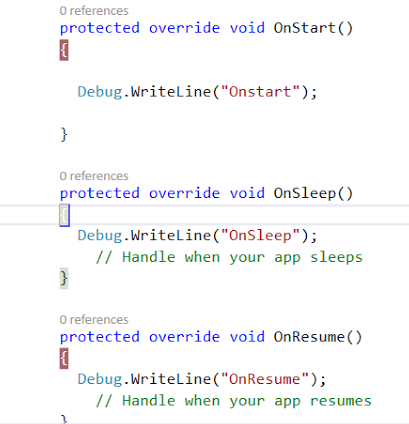
Xamarin Forms Activity Lifecycle

Image
Before starting with Xamarin Forms it's important that we should have a strong knowledge of Xamarin Forms Activity Life Cycle. So without wasting any time let's dive into it. Let's create a Xamarin Forms Project in Visual Studio 2017 or Xamarin Studio. Once you've successfully created a Xamarin Forms Project then you'll see App.cs Page. Open it up and in this App.cs you'll see three different activity methods;  i.e., OnStart() OnSleep() OnResume() OnStart   : is called the first time you launch an application. OnSleep   : is called when your activity goes into the background state. OnResume  : is called when your activity again comes on the front screen or simply says when your application comes from the OnSleep state, then the OnResume method will be called. Enough for this for now --  it's time to put in some break point and try to implement this life cycle in your Xamarin Forms Application. I've simply put three different b...